
You've just set up your streaming software, your mic sounds crisp, and you're ready to go live—but your stream looks... basic. You know overlays can help, but should you grab a free template or invest in premium assets? Let's break down what's actually worth your money.
The Real Cost of "Free" Overlays
Free overlays seem like the perfect starting point, and honestly, they can be. But here's what most streamers discover after a few weeks:
The Good: Free overlays let you test layouts, learn your streaming software, and get comfortable with the technical setup without financial risk. They're perfect for your first few streams while you're still figuring out your brand.
The Reality: Thousands of other streamers are using the exact same free pack. Your viewers have seen that alert animation on five other channels this week. Free assets rarely include customization files, so you're stuck with colors and fonts that might clash with your brand. Most importantly, free packs often lack the polish that keeps viewers engaged—think choppy animations, mismatched resolutions, or outdated design trends.

What Premium Overlays Actually Give You
Premium stream assets aren't just "fancier versions" of free ones. Here's what you're really paying for:
1. Unique Visual Identity
When you invest in a quality overlay pack like our Celestial Violet Vtuber Stream Pack, you're getting cohesive branding that sets you apart. Every element—from your starting screen to your alerts—works together to create a memorable viewer experience. The animated constellation patterns and pastel purple aesthetic create an instantly recognizable brand.
2. Professional Animation Quality
Compare a static free webcam border to something like the Cyberpunk Stream Overlays with its smooth glitch effects and neon animations. Premium assets are optimized for streaming—they look crisp at 1080p, don't cause frame drops, and include transparency layers that blend seamlessly with your content.


3. Complete Ecosystem
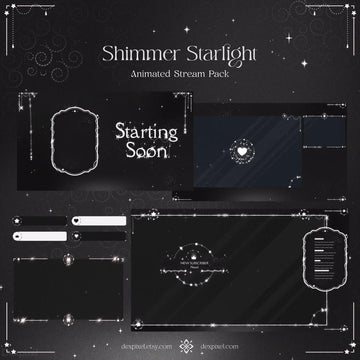
Free packs usually give you one or two pieces. Premium stream packs include everything: starting soon screens, BRB scenes, ending screens, alerts, panels, and webcam frames that all match. Our Shimmer Starlight Stream Pack is a perfect example—you get overlays, panels, alerts, and offline screens in one cohesive gold and black aesthetic.
4. Seasonal & Trend-Ready Options
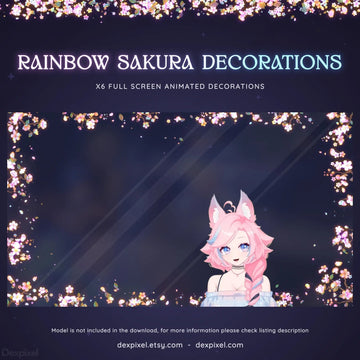
Premium creators release themed packs for holidays and trends. The Sakura Animated Stream Decorations with cherry blossom animations is perfect for spring streams or Japanese aesthetic themes—something you won't find in generic free libraries.
The Smart Investment Strategy
Here's the approach that works for most successful streamers:
Weeks 1-2: Start Free
Use free overlays to learn OBS/Streamlabs, test layouts, and figure out what elements you actually need. Focus on audio quality and content during this phase.
Week 3-4: Invest in Your First Premium Pack
Once you're streaming consistently (2-3 times per week), invest in a complete stream pack that matches your personality. Choose something versatile that you won't outgrow quickly. Our Lunar Charm Stream Pack offers a minimalistic design that works for gaming, chatting, or creative streams.
Month 2+: Add Specialty Pieces
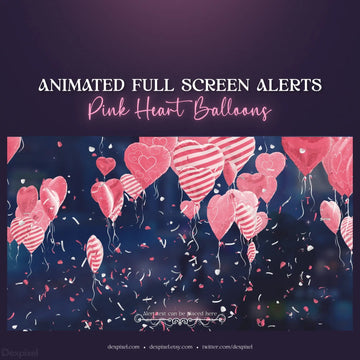
As you grow, add unique elements like the Jewel Drop Full Screen Animation for special moments—sub goals, raids, or celebrations. These premium touches make your stream feel event-like.
What's Actually Worth Buying First?
If you're on a budget, prioritize in this order:
1. Complete Stream Pack (€20-50)
Get everything matching in one purchase. Packs like our Green Tea Tessellate Stream Pack give you all essential scenes and overlays for one price—better value than buying pieces separately.
2. Animated Webcam Frame (€8-15)
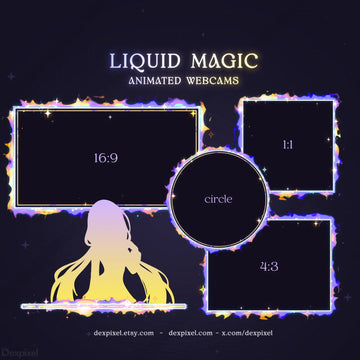
This is visible 100% of your stream time. An animated frame like the Red Sakura Animated Cherry Blossom Designs adds movement and polish without overwhelming your content.
3. Alert Animations (€10-20)
Viewers notice these during key moments. Premium alerts feel rewarding and encourage more follows and subs.
4. Specialty Overlays (€5-15 each)
Add themed pieces for holidays or special streams once your core branding is solid.
Red Flags: Premium Overlays NOT Worth Buying
Not all paid overlays are created equal. Avoid:
- Packs with only 2-3 items charging premium prices
- Assets without preview videos (you can't see the animations in action)
- Overlays that don't specify resolution or file formats
- Designs that are overly complex and distract from your gameplay or facecam
- Packs without installation guides or support
The Bottom Line
Free overlays are perfect for testing and learning. Premium overlays are worth buying when you're ready to build a recognizable brand and stand out in a crowded streaming landscape.
The sweet spot? Invest in one complete premium stream pack (€30-50) after your first month of consistent streaming. Choose something that reflects your personality and content style—whether that's the edgy Cyberpunk Glitch aesthetic, the soft Celestial Violet Vtuber vibes.
Your stream's visual identity is an investment in viewer retention. When someone stumbles onto your channel, you have about 3 seconds to make an impression. Premium overlays help you make those seconds count.
Ready to upgrade your stream? Browse our complete collection of animated stream packs and overlays designed specifically for Twitch, YouTube, and VTuber streamers. Use code BLOG15 for 15% off your first purchase.